
AI Study Workspace

SSOCNote

Keep studying, even when the materials pile up.

Bring in a PDF, mark it up, ask AI when you get stuck, then turn the same material into review before the exam.

Mac · iPad · iPhone · iCloud
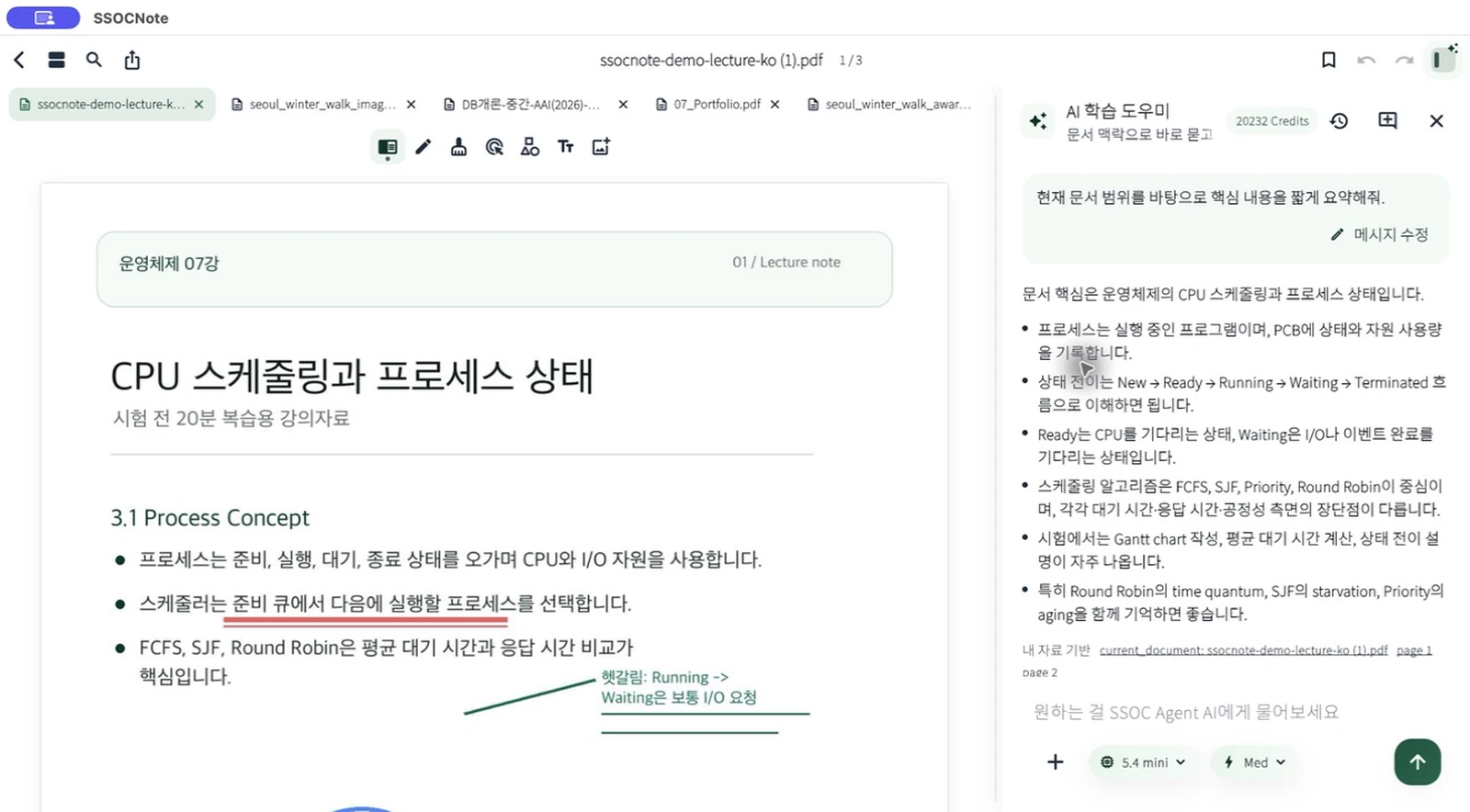
SSOCNote Mac screen with the Document AI sidebar open
#Free notes #Document AI #Review

Free notes. AI when it matters.

Start free, then let AI step in when studying gets stuck.

Do not start by paying for a note app. Bring in a PDF, read it, mark it up, and use AI Credits only when you need explanation, summaries, or review.

01

Still paying for a note app before you even start?

SSOCNote keeps the basic study space free: import PDFs, read, annotate, and organize. Add AI only when it helps.

Free notesPDF organizationLower barrier
02

Do not freeze in front of a dense PDF.

Ask from the page you are reading or the exact range you selected, then get explanations, summaries, or practice questions.

Current pageSelectionGrounded AI
03

When a lecture did not land, do not replay it from zero.

Turn recordings into transcripts and summaries so the important thread stays inside your lecture note.

Lecture audioAI summaryNote handoff
04

Make annotations useful when you come back later.

Keep pen, highlights, images, and bookmarks together so class marks still make sense after the class ends.

HandwritingHighlightsBookmarks
05

Spend exam night checking, not rebuilding notes.

Turn documents and lectures into study sheets, cheat sheets, and practice questions you can scan quickly.

Study sheetsCheat sheetsPractice
06

Handle the “I read this, but forgot it” moment.

Create review cards from PDFs and lectures, then use short iPhone sessions to pull the memory back.

Review cardsProgressRecall loop
07

Move between Mac, iPad, and iPhone without restarting.

iCloud connects materials, annotations, and review across Apple devices.

iCloudApple devicesContinuity

A free place to start

Open, mark, and organize your materials before deciding whether AI is needed.

AI works from the scope you choose

Answers stay grounded in the page, selection, or document you asked it to use.

Built around Apple-device study

Organize on Mac, annotate on iPad, and review on iPhone without splitting the workflow.

Privacy PolicyAI Data ProcessingSubprocessorssupport@ssocnote.com

Beta

Open the free workspace first. Add AI when you need it.

Bring in a PDF, mark it up, ask when you are stuck, and turn it into review before the exam.

Start on TestFlight See AI Credits

TestFlight access depends on Apple policies and beta capacity.